


CaptionCall
4.11.09K Reviews
App Specs
- Version
- 39.0.2608
- Updated On
- License
- Free
- Downloads
- 500,000+
- Developer
- CaptionCall, LLC
- Categories
- Communication
- Platform
- Android
Screenshots
 Analysis by AppCompare
Phone conversations can become tiring when hearing every word depends on perfect audio, a quiet room, or a caller who remembers to speak slowly. I found CaptionCall most useful in that exact gap: it is a communication app built around captions during phone calls, rather than a general chat service or a replacement for the phone app. That focused purpose makes it easier to understand where it belongs in daily life.
Developed by CaptionCall, LLC, the app is free and available to an Everyone audience. It sits in the communication category and has reached more than 500 thousand installs, with an average rating of 4.1 from roughly 4.3 thousand ratings. Those figures suggest a reasonably established user base, but they do not remove the need to judge whether captioned calling fits your own hearing needs, phone habits, and comfort with on-screen text.
How CaptionCall fits real conversations and different abilities
I find CaptionCall most useful when the challenge is not conversation itself but keeping up with a phone call in real time. In this section, I look at how reading and listening together can change the experience for people with different hearing, vision, and mobility needs. I’ll also consider when that combination is genuinely helpful—and when another way of communicating may feel more natural.
Readability and navigation during a call
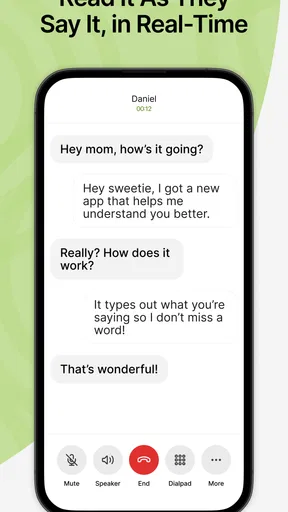
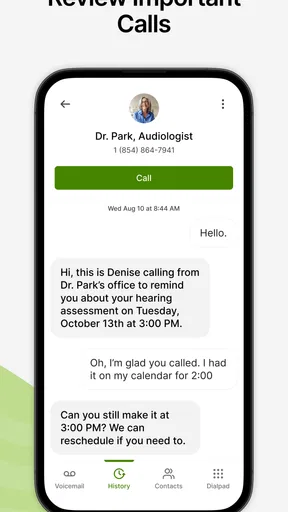
The central benefit is straightforward: instead of relying only on the caller’s voice, I can follow the conversation through written captions on the phone screen. That changes the experience from “try to catch every sound” to “use sound and text together.” For someone who misses occasional words, struggles with certain voices, or needs extra confirmation for names and numbers, that second channel can make a call feel far less stressful.
CaptionCall is especially practical for conversations that contain details worth checking. A medical office, delivery service, school, bank, or repair company may mention an appointment time, reference number, address, or instruction. With captions visible, I can keep my eyes on the wording instead of asking the other person to repeat every detail. I still pay attention to the voice, but the text gives me a useful safety net.
The app’s interface is best understood as a focused calling environment rather than a large communication suite. That is a strength for people who do not want to navigate a crowded collection of social features, channels, stickers, or messaging tools. The task stays clear: place or answer a phone call and follow the conversation with captions.
At the same time, captioned text is only helpful when it is easy for the individual reader to follow. People differ in visual acuity, reading speed, contrast sensitivity, and tolerance for moving text. I would test the app during a calm call before depending on it for an important appointment. If the words move too quickly, if the screen is difficult to read, or if switching attention between text and the speaker becomes tiring, the experience may need adjustment through the phone’s own display and accessibility settings.
Worth Reading Before You Choose

EA SPORTS FC Mobile 26 Is a Bigger Football Game, but It Takes Time

Flipboard Shows What News Apps Must Do Beyond the Feed

Switching to Android Auto Means Rethinking Your Driving Routine

Google Calendar Makes a Crowded Week Easier to Manage

Ludo King Makes the Most of the Minutes Between Plans

Baby Panda World Brings Quick Play to Modern Phones, but Its Game Library Feels Busy
A useful habit is to keep the phone positioned where the screen can be read without holding it awkwardly. That matters more than it sounds. If the device is flat on a table, partly covered, or too far away, captions lose much of their value. A stand or stable surface can make longer calls more comfortable, particularly for someone with limited hand strength or difficulty maintaining a grip.
Motor and sensory considerations
CaptionCall can reduce the pressure to hear perfectly, but it does not remove every physical demand of a phone call. The user still has to answer, place, hold, or position the device, and the screen remains important. Someone with tremors, limited dexterity, or difficulty tapping small controls may find the calling steps more demanding than the captioning itself.
For that reason, I would set up the app when there is no urgency. Save the necessary contact details, learn how incoming calls appear, and practice reading captions while speaking naturally. A first test call with a trusted person is more useful than discovering the workflow while a clinic or employer is waiting on the line.
The app can also help people who experience listening fatigue. Concentrating intensely on speech for a long call can be exhausting even when the person hears reasonably well in short exchanges. Captions let the eyes share some of the work. That does not mean the app is effortless: reading continuously can cause its own fatigue, especially for users with visual processing difficulties, dyslexia, headaches, or limited stamina. The advantage is flexibility. I can use the text as a backup instead of treating it as the only source of information.
People with combined hearing and vision challenges should judge the experience carefully. Captioning naturally depends on seeing text, so it may not be the right primary solution for someone who cannot comfortably read a phone display. In that situation, a different assistive communication method, a relay service designed for the person’s needs, or support from a hearing professional may be more appropriate. CaptionCall is not a universal answer simply because it adds words to a call.
Another practical point is attention. When I read captions, I am dividing focus between the caller’s voice, the text, and the conversation itself. That can be helpful when speech is unclear, but it can also become distracting in a fast exchange. I would not treat captions as permission to multitask while driving, walking through traffic, or handling equipment. The app improves access to spoken communication; it does not make divided attention safe.
Situational access beyond the quiet living room
The strongest use case is not necessarily a long personal call. It is the short, consequential conversation that would otherwise be difficult to manage. Imagine receiving a call from a pharmacy while preparing dinner. The room is noisy, your hands are occupied, and the caller gives a pickup instruction. Captions can provide a visual reference when the audio is interrupted by background sound. I would still move to a safer, quieter position if possible, because clearer conditions help both the voice and the text.
The same applies to calls from unfamiliar numbers. A person who normally avoids answering may feel more willing to pick up when written support is available. That can be valuable for appointment confirmations, service updates, housing matters, or family calls from a place with poor acoustics. The benefit is not merely convenience; it can reduce the social and practical cost of missing calls.
CaptionCall may also suit households where one person hears well and another does not. The hearing user does not need to completely change the way they speak, although clear pacing remains considerate. The person using captions can follow along without asking for constant repetition. I would explain the setup to frequent callers and encourage them not to speak over one another. Captioning works best when the conversation itself is orderly.
Public spaces create a more complicated picture. Cafés, waiting rooms, vehicles, and busy offices introduce competing voices and movement. Captions may offer useful reinforcement, but they should not be treated as a guarantee that every word will remain clear in difficult conditions. A headset, quieter corner, or scheduled callback may still be the better choice. The app improves access within a call; it cannot control the acoustics around the phone or the clarity of the other person.
For work, I would consider it a helpful personal communication aid rather than a complete workplace accommodation plan. A captioned call may make a one-to-one conversation more manageable, but meetings with several speakers, rapid turn-taking, technical vocabulary, or screen sharing can demand a different solution. If the call affects employment, healthcare, education, or legal rights, I would arrange a backup method instead of relying on one app alone.
What can make the experience less inclusive
The biggest limitation is that captions are not the same as perfect understanding. Names, accents, specialist terms, background noise, interruptions, and poor phone connections can all make text harder to trust. I would repeat important information aloud, ask the caller to confirm spelling, and write down critical details independently. For an appointment, it is sensible to repeat the date and time before ending the call, even when the caption appears clear.
There is also a learning curve for the people around the user. A family member may speak too quickly, while a customer-service representative may interrupt or place the caller on hold without explaining what is happening. CaptionCall can support the user, but it cannot make an impatient caller communicate well. A short explanation such as “I use captions, so please pause between points” can improve the conversation more than any setting.
Dependence on the phone screen is another barrier. A user may need to keep the display visible for the entire conversation, which is inconvenient when carrying groceries, moving around the home, or sharing the phone with someone else. Long calls can also create neck or arm strain if the device is held at an awkward angle. Hands-free positioning may help, but the exact comfort depends on the phone and the person’s mobility.
I would also avoid assuming that a free app is cost-free in every practical sense. The app itself is free, but a user still needs a compatible phone, an active mobile or internet connection as required by their normal calling setup, and enough confidence with the device to answer and manage calls. Those surrounding requirements matter for older adults, people with limited data access, and anyone using a phone that is already difficult to operate.
Privacy and comfort deserve a personal decision as well. Phone conversations can contain health, financial, family, or workplace information. Before using any captioning service for sensitive calls, I would read the app’s current privacy and service explanations and decide whether the arrangement feels acceptable. I would not share confidential information casually in a public place simply because captions make the audio easier to follow.
Compatibility with personal routines is another deciding factor. Someone who mainly uses text messaging, email, or video calls may not gain much from a phone-captioning tool. If nearly every conversation already happens through written chat, the simplest option may be to continue using that channel. CaptionCall is most compelling for people who need to participate in ordinary voice calls, not for users looking for a broad replacement for all communication.
Version, expectations, and choosing the right user
The current version is 39.0.2608, and the app supports operating system version 9 or later. That makes checking the phone’s software important before planning around it. If the device is older, updates are unavailable, or the phone behaves slowly during calls, the user should test the complete experience rather than assuming installation alone will solve the problem.
I would recommend CaptionCall to someone who wants more confidence during everyday phone conversations and benefits from seeing spoken words while listening. It is particularly appealing for people who miss occasional phrases, struggle in noisy environments, or become anxious when a caller gives important information quickly. The free price also makes it easy to try without committing money first.
I would be more cautious for a person who cannot comfortably read a moving phone screen, needs communication in group meetings, depends on highly specialized terminology, or wants a messaging platform rather than captioned calling. In those cases, a dedicated relay option, live transcription service, video communication tool, or ordinary text conversation may be a better fit. The right choice depends on whether the main obstacle is hearing a phone caller, reading small text, managing the device, or communicating in a complex group.
My practical recommendation is to test three situations: a quiet call with a familiar person, a call containing names and numbers, and a moderately noisy call. Notice whether the captions arrive in a readable way, whether you can keep up without strain, and whether you feel more independent afterward. Then try a real low-risk call, such as confirming a routine service, before using it for a time-sensitive or high-consequence conversation.
It is also worth creating a personal backup routine. Keep a notepad nearby, confirm key details verbally, and ask callers to repeat anything that looks unclear. If the call becomes confusing, request a callback or switch to a written channel when available. These small habits turn captioning from a passive display into a more reliable communication strategy.
My inclusive verdict
After looking at CaptionCall through the lens of different abilities and environments, I see a focused tool with a meaningful everyday purpose. Its value is not that it makes every phone call effortless. Its value is that it gives the user another way to follow speech, check details, and stay involved when audio alone is unreliable.
The app is most successful when the user can read the screen comfortably, the conversation has one or two speakers, and the phone is positioned securely. It is less convincing in fast group discussions, highly technical calls, or situations where visual reading is itself difficult. Those boundaries are important, because realistic accessibility advice should describe where a tool helps and where another option is wiser.
With an average rating of 4.1 and more than 500 thousand installs, CaptionCall has reached a substantial audience, while its Everyone age rating keeps its intended use broad. I would not choose it simply because it is popular. I would choose it because captioned phone conversations address a specific barrier in my daily routine.
My bottom line: CaptionCall is worth trying if hearing phone calls clearly is the problem you want to solve, especially when missed words affect appointments, services, or family contact. Give yourself time to practice, keep a backup for important conversations, and remember that captions work best as an additional path to understanding—not as a promise that every call will be perfectly readable.
For the right person, that extra path can make answering the phone feel less like a test and more like an ordinary part of staying connected.
Pros
- Free captioned calls can improve accessibility for people with hearing loss.
- Large
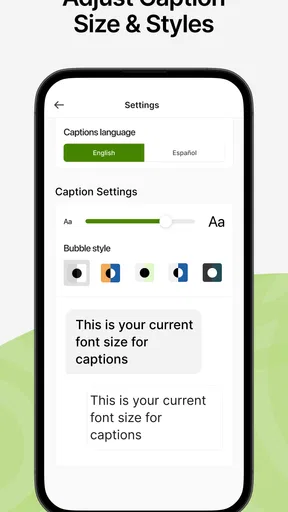
- readable captions make conversations easier to follow.
- Incoming speech is displayed in real time during calls.
- Useful call controls help users manage conversations more comfortably.
- Can support greater independence when communicating by phone.
Cons
- Availability may depend on eligibility and service coverage in your area.
- Caption accuracy can vary with accents
- background noise
- or poor connections.
- The app may require a stable internet connection for reliable captions.
- Some callers may need time to adjust to the captioned-call process.
- Privacy-conscious users may have concerns about speech being transcribed.
FAQs for CaptionCall
What is CaptionCall, and who is it designed for?
CaptionCall is a captioned telephone service designed primarily for people who have hearing loss and want to follow conversations more easily. During a call, spoken dialogue is displayed as readable text while the conversation continues normally. Availability, eligibility, and supported features can vary by country or service area, so users should confirm that CaptionCall is offered where they live before downloading or requesting access.
How does CaptionCall provide captions during phone calls?
CaptionCall uses captioning technology and, depending on the service and call type, may involve trained captioning agents who transcribe spoken conversations in near real time. The captions appear on the compatible device while the user listens and speaks normally. Because captions are generated as a conversation happens, there can occasionally be a short delay, transcription mistake, or difficulty with accents and background noise.
Is CaptionCall free to download and use?
The application itself may be available at no cost, but downloading it does not necessarily mean every related service is free or available to everyone. CaptionCall access can depend on eligibility requirements, telecommunications regulations, equipment, and location. Before signing up, review the current provider terms carefully, including any charges for devices, internet usage, optional services, or calling features that may apply.
What devices and permissions does CaptionCall require?
CaptionCall compatibility depends on the current version of the app and the operating system. Users generally need a supported Android or iOS device, a reliable internet connection, and permission for features such as the microphone, phone functions, notifications, or accessibility tools. Granting these permissions is important for calling and captions to work, but you should review them and install the app only from an official store.
Can CaptionCall be used for emergency calls or every type of phone conversation?
Users should not assume that CaptionCall works identically for emergency calls, international numbers, video calls, conference calls, voicemail, or calls made through other applications. Availability may depend on the device, network, account configuration, and local regulations. Before relying on it as a primary communication method, read the provider’s emergency-calling guidance and keep an alternative way to contact emergency services available.


